
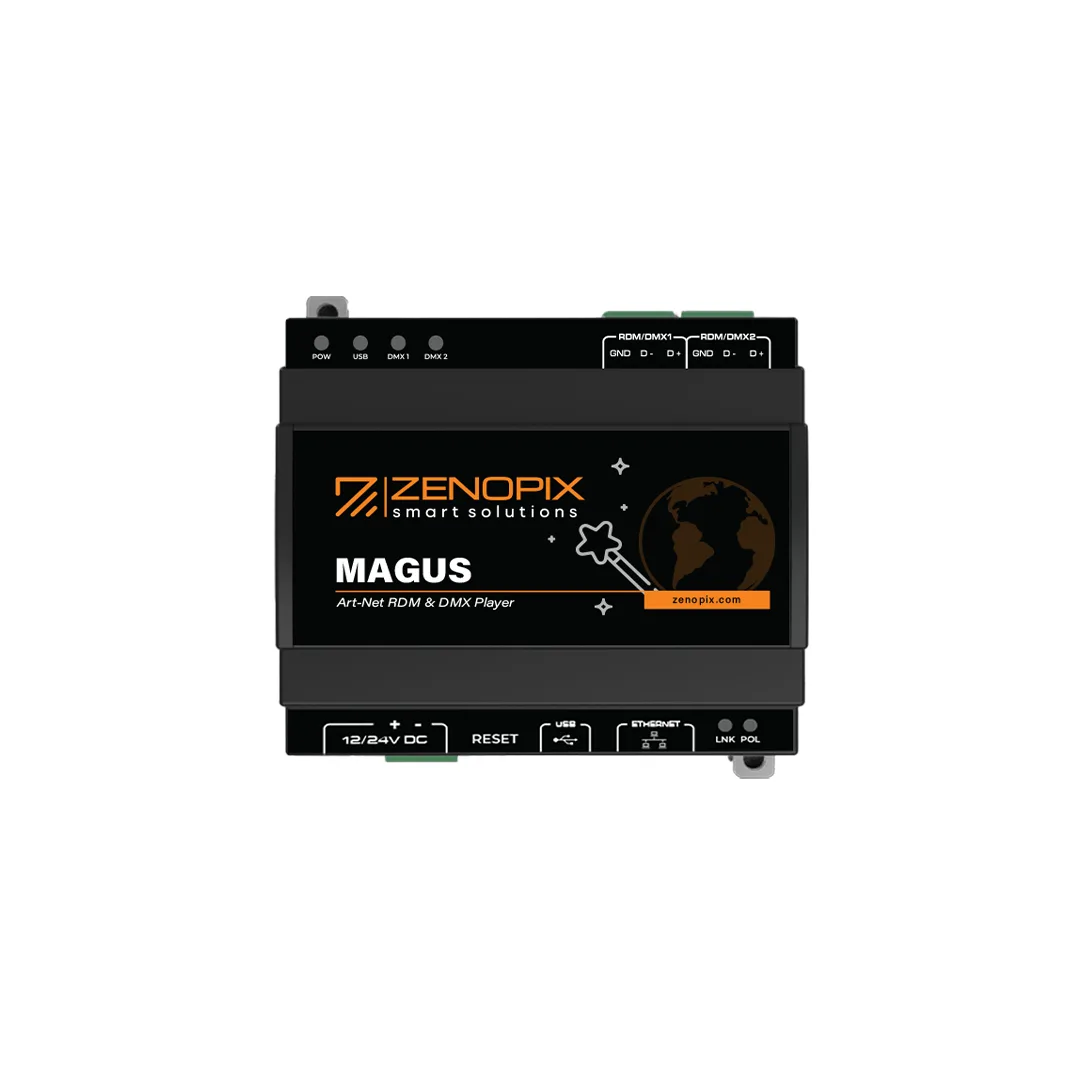
Magus
Zenopix Magus Art-Net RDM/DMX Controller
Art-Net · RDM/DMX · 2 universes · DIN rail
The Zenopix Magus is a DIN rail mounted Art-Net RDM/DMX controller that converts Art-Net data received over 10/100 Mbit/s Ethernet into 2 RDM/DMX universes at 40 frames per second. It allows RDM devices to be discovered, addressed and configured remotely with the free Zenopix Explorer software. It is developed for architectural, stage and large-scale lighting projects.
SKU: MAGUS-2-RM-TB
Highlights
- 2 RDM/DMX universes
- Automatic addressing with Zenopix Explorer
- 32 RDM devices per universe
- Failsafe and online firmware updates
Documents
Address RDM fixtures over Art-Net
The Zenopix Magus MAGUS-2-RM-TB is a professional Art-Net RDM/DMX controller that converts Art-Net data received over an Ethernet network into 2 independent RDM/DMX outputs. With RDM (Remote Device Management, ANSI E1.20) support, it allows compatible decoders and fixtures to be discovered, addressed and monitored. All setup is carried out with the free Zenopix Explorer software. After commissioning, the same device transmits the data received from Zenopix NEO, MADRIX or Resolume Arena to the DMX line and provides real-time lighting control.
Key Features of the Magus Art-Net RDM/DMX Controller
- 2 RDM/DMX outputs: 2 universes on 3-pin 5.08 mm pluggable terminals
- RDM per universe: 32 devices recommended, up to 170 RGB fixtures
- Channels: 512 with RDM on, up to 1,024 with RDM off
- Refresh rate: 40 FPS at 512 channels, 20 FPS at 1,024 channels
- Art-Net input over 1 x RJ45, 10/100 Mbit/s Ethernet
- Zenopix Explorer: discovery, Identify, automatic addressing, and sensor readings
- Failsafe after 10 s without Art-Net: Release DMX Line, Hold Blackout, or Hold Last Look
- DIN rail plastic housing, 160 g, 12–24 V DC, <8 W
Technical Specifications and Hardware Advantages
The Zenopix Magus MAGUS-2-RM-TB accepts 12–24 V DC through a 2.1 mm barrel jack or a 5.08 mm terminal and consumes <8 W. Use only one input at a time. An adapter must supply at least 12 W, for example 24 V at 0.5 A or more.
Each port has its own RDM switch, so you can enable RDM only where you need it. RDM discovery runs between normal DMX packets, and with RDM off, a port carries up to 1,024 channels at 20 FPS. Six status LEDs show power, USB, DMX activity on both ports, Ethernet link, and Art-Net polling.
Applications
The Zenopix Magus serves projects that need both remote device setup and live DMX control. Typical uses of this Art-Net RDM/DMX controller include:
- Commissioning architectural lighting with many RDM decoders without visiting each fixture.
- Stage productions and entertainment venues that run Art-Net shows on 2 universes.
- Large-scale installations that need temperature and voltage readings from RDM sensors.
- Maintenance of installed RDM decoders, using Identify to locate each unit on site.
Software
Zenopix software used with the Magus.
Zenopix Explorer
Find, address and configure RDM devices from your computer. Free.
Order code
| Product code | MAGUS | 2 | RM | TB |
|---|---|---|---|---|
| Capacity | ||||
| 2 universe outputs | 2 | |||
| Enclosure type | ||||
| DIN rail mount | RM | |||
| Connection | ||||
| Pluggable terminal block | TB | |||
Order code: MAGUS-2-RM-TB.
Technical Specifications
| Model | Zenopix Magus |
| SKU | MAGUS-2-RM-TB |
| Product Type | Art-Net RDM/DMX controller |
| Input Protocols | Art-Net |
| Output Protocol | DMX, RDM (ANSI E1.20) |
| DMX Outputs | 2 x 3-pin 5.08 mm pluggable terminal block |
| DMX Universes | 2 |
| DMX Channels | 512 per universe with RDM (recommended), up to 1,024 with RDM off |
| RDM Support | Yes, 32 devices per universe recommended, up to 170 RGB fixtures |
| DMX Refresh Rate | 40 FPS at 512 channels, 20 FPS at 1,024 channels |
| Network Interface | 1 x RJ45, 10/100 Mbit/s Ethernet |
| IP Configuration | Static IP, default 192.168.1.230 / 255.255.0.0, gateway 192.168.0.1 |
| Configuration Method | Web interface, Zenopix Explorer (free) |
| Compatible Software | Zenopix Explorer, Zenopix NEO, Zenopix Solus, MADRIX, Resolume Arena, Jinx |
| Firmware Update | Online via web interface, USB 2.0 Type B port |
| Standalone Mode | Single-color output from a saved test color; full shows with Zenopix Solus |
| Failsafe | After 10 s without Art-Net: Release DMX Line, Hold Blackout, or Hold Last Look |
| Supported Addressing ICs | TM512, UCS512C, SM16512, SM18522, GS8511, GS8512, GS8513, GS8515, GS8516, GS8516B, GS8521, GS8523, GS8524, GS8525, GS8526 |
| Power Input | 12–24 V DC, 2.1 mm barrel jack or 2-pin 5.08 mm terminal |
| Power Consumption | <8 W |
| Operating Temperature | 0–60 °C |
| Storage Temperature | -10 to 70 °C |
| Operating Humidity | 20–70% RH, non-condensing |
| IP Rating | IP20 |
| Mounting | DIN rail or wall |
| Housing Material | Plastic |
| Dimensions (L x W x H) | 105.14 x 103.12 x 57.04 mm |
| Weight | 160 g |
| Indicators | 6 status LEDs (POW, USB, DMX1, DMX2, LNK, POL) |
| Certifications | CE, RoHS |
| Warranty | 2 years standard, extendable by 3 years to 5 years |
| Package Contents | 1 x Zenopix Magus, 2 x 3-pin female terminal blocks, 1 x 2-pin female terminal block, 1 x technical document and quick guide, 1 x warranty certificate, 1 x device test report |
- Model
- Zenopix Magus
- SKU
- MAGUS-2-RM-TB
- Product Type
- Art-Net RDM/DMX controller
- Input Protocols
- Art-Net
- Output Protocol
- DMX, RDM (ANSI E1.20)
- DMX Outputs
- 2 x 3-pin 5.08 mm pluggable terminal block
- DMX Universes
- 2
- DMX Channels
- 512 per universe with RDM (recommended), up to 1,024 with RDM off
- RDM Support
- Yes, 32 devices per universe recommended, up to 170 RGB fixtures
- DMX Refresh Rate
- 40 FPS at 512 channels, 20 FPS at 1,024 channels
- Network Interface
- 1 x RJ45, 10/100 Mbit/s Ethernet
- IP Configuration
- Static IP, default 192.168.1.230 / 255.255.0.0, gateway 192.168.0.1
- Configuration Method
- Web interface, Zenopix Explorer (free)
- Compatible Software
- Zenopix Explorer, Zenopix NEO, Zenopix Solus, MADRIX, Resolume Arena, Jinx
- Firmware Update
- Online via web interface, USB 2.0 Type B port
- Standalone Mode
- Single-color output from a saved test color; full shows with Zenopix Solus
- Failsafe
- After 10 s without Art-Net: Release DMX Line, Hold Blackout, or Hold Last Look
- Supported Addressing ICs
- TM512, UCS512C, SM16512, SM18522, GS8511, GS8512, GS8513, GS8515, GS8516, GS8516B, GS8521, GS8523, GS8524, GS8525, GS8526
- Power Input
- 12–24 V DC, 2.1 mm barrel jack or 2-pin 5.08 mm terminal
- Power Consumption
- <8 W
- Operating Temperature
- 0–60 °C
- Storage Temperature
- -10 to 70 °C
- Operating Humidity
- 20–70% RH, non-condensing
- IP Rating
- IP20
- Mounting
- DIN rail or wall
- Housing Material
- Plastic
- Dimensions (L x W x H)
- 105.14 x 103.12 x 57.04 mm
- Weight
- 160 g
- Indicators
- 6 status LEDs (POW, USB, DMX1, DMX2, LNK, POL)
- Certifications
- CE, RoHS
- Warranty
- 2 years standard, extendable by 3 years to 5 years
- Package Contents
- 1 x Zenopix Magus, 2 x 3-pin female terminal blocks, 1 x 2-pin female terminal block, 1 x technical document and quick guide, 1 x warranty certificate, 1 x device test report
Installation and Software Integration
The Zenopix Magus mounts on a DIN rail and ships with the IP address 192.168.1.230, subnet mask 255.255.0.0, and gateway 192.168.0.1. Connect RDM devices in a daisy chain and terminate the line with a 120-ohm resistor. To address RDM devices:
- Set your computer to the same subnet, for example 192.168.1.10 / 255.255.0.0, and open 192.168.1.230.
- Under Output Port Configuration, set the universe of the port and turn on its RDM switch.
- Press SAVE OUTPUTS and check the number of devices found in the DEVICES field.
- Open Zenopix Explorer and find the Magus in the Interfaces panel.
- Select a device and change its DMX Start Address, or use the Universe / Port Editor (F3) for automatic addressing.
Close Zenopix Explorer before you run Zenopix NEO, MADRIX, or Resolume Arena, because both should not run at the same time. In Zenopix NEO, add the Magus under Patch > New Patch.
Documents
User manual (PDF)
Magus training videos
The training series explains Zenopix Magus and Zenopix Explorer step by step, from Art-Net, RDM and decoder basics to network settings, RDM addressing and sensor monitoring. The videos can be watched here or as a full playlist on YouTube.
Frequently Asked Questions
Related: Zenopix NEO, Zenopix Explorer, Zenopix Velox, Zenopix Solus, Zenopix AER.
