
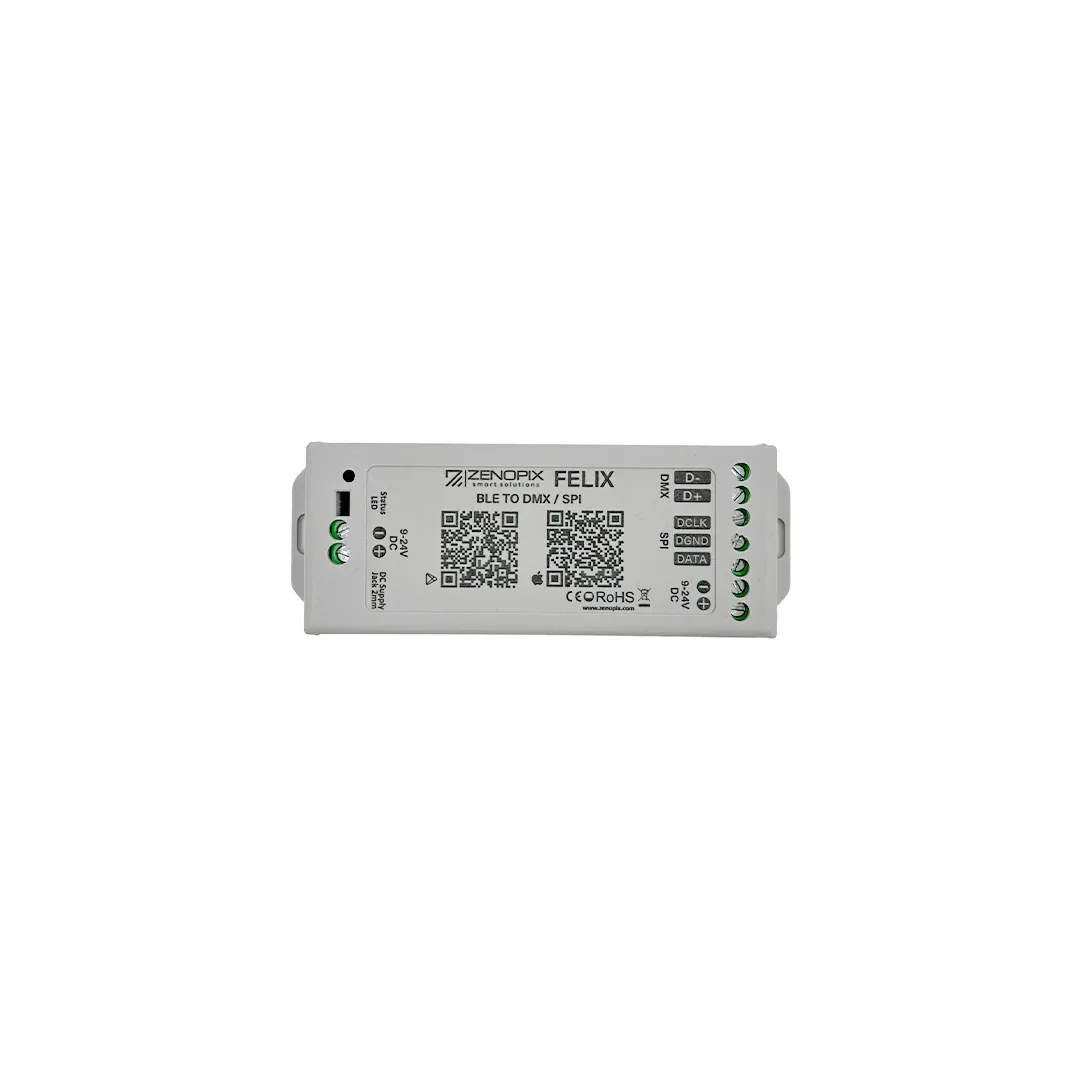
Felix Pro
Zenopix Felix Pro App-Controlled Bluetooth DMX/SPI Controller
Bluetooth · DMX and SPI · phone app · built-in animations
The Zenopix Felix Pro is a Bluetooth DMX/SPI controller managed from the Zenopix Felix Pro mobile app. It controls DMX LEDs and pixel LEDs such as WS2812 and APA102, up to 4,096 channels on 12–24 V DC. Operating without a computer or network infrastructure, the Felix Pro is developed for decorative, architectural and entertainment lighting. With models with and without an SD card, it offers suitable solutions for different requirements.
Model
FLXPRO-X
Built-in animations, playlists, drawings
Multi-Unit Control: Up to 4 units together
FLXPRO-S
Adds SD card playback
Multi-Unit Control: Single unit
Highlights
- Controlled from the Zenopix Felix Pro app
- 1 DMX and 1 SPI output
- 12 built-in animations and playlists
- Microphone and drawing modes
Documents
Lighting control from your phone
The Zenopix Felix Pro is a Bluetooth DMX/SPI controller that plays colors, animations, drawings and music-reactive effects without the need for a computer. The FLXPRO-X model is managed entirely from the Zenopix Felix Pro mobile app. In addition to these features, the FLXPRO-S model allows animations recorded in Zenopix NEO to be played from an SD card. Both models have 1 DMX and 1 SPI (Serial Peripheral Interface) output with screw terminals. All setup, update and control operations are carried out with ease over Bluetooth.
Key Features of the Felix Pro Bluetooth DMX/SPI Controller
- Outputs: 1 x DMX and 1 x SPI with clock line, up to 4,096 channels
- LED types: Single, Tunable, RGB, RGBW, and RGBWC
- Pixel ICs: WS2812, WS2811, SK6812, APA102, and similar chips
- 12 built-in animations plus custom playlists stored in the device
- Microphone mode with 5 sound effects, including a spectrum view for matrix panels
- Drawing mode: paint pixels on the panel map and animate them with 8 effects
- DMX chip addressing and LED order test from the app
- Firmware updates over Bluetooth from the phone
Technical Specifications and Hardware Advantages
The Zenopix Felix Pro runs on 12–24 V DC and draws a maximum of 10 W. Reverse polarity protection guards the input. A power output terminal can pass up to 3 A to the LEDs. For loads above 3 A, feed the LEDs directly from the power supply.
The plastic housing measures 105 x 43 x 25 mm and weighs 60 g. The Felix Pro operates at 0–55 °C and 20–95% RH and is rated IP20. The SPI output supports a clock line, so the Felix Pro drives 2-wire chips such as APA102 as well as 1-wire chips such as WS2812. Maximum signal distance is 100 m for DMX and 5 m for SPI.
Applications
The Zenopix Felix Pro suits permanent installations where a phone replaces a lighting computer. Typical projects for this Bluetooth DMX/SPI controller include:
- Decorative LED strip installations that loop stored animations and playlists.
- LED matrix panels that show pixel drawings or a music spectrum.
- Entertainment lighting that follows music played on the phone.
- Architectural accents with Tunable or RGBW fixtures set from the app.
Software
Zenopix software used with the Felix Pro.
Order code
| Product code | FLXPRO | X |
|---|---|---|
| SD card | ||
| Version with SD card | S | |
| Version without SD card | X | |
Example: FLXPRO-S is the Felix Pro with SD card.
Which Felix Pro Model Should I Choose?
Both Felix Pro models share the same outputs, app, and specifications. They differ in SD card support:
- Choose the FLXPRO-X for app control of up to 4 synchronized units with built-in animations.
- Choose the FLXPRO-S to play animations recorded in Zenopix NEO from an SD card.
Unlike the FLXPRO-X, the FLXPRO-S works with Zenopix NEO but is controlled as a single unit.
Common Specifications
These values apply to all Felix Pro models. Differences are named in the row.
| Model | Zenopix Felix Pro |
| Product Type | Bluetooth DMX/SPI controller |
| Output Protocol | DMX, SPI (with clock line) |
| DMX Outputs | 1 x DMX, 1 x SPI, screw terminal block |
| DMX Channels | Up to 4,096 in total |
| RDM Support | No |
| Supported LED ICs | WS2812, WS2811, SK6812, APA102, and similar |
| LED Types | Single, Tunable, RGB, RGBW, RGBWC |
| Network Interface | Bluetooth (BLE) |
| Configuration Method | Zenopix Felix Pro phone app |
| Firmware Update | Over Bluetooth from the phone app |
| Standalone Mode | Yes, animations, playlists, and drawings stored in the device; FLXPRO-S adds SD card playback |
| Power Input | 12–24 V DC |
| Power Output | Pass-through terminal, max 3 A |
| Power Consumption | 10 W max |
| Operating Temperature | 0–55 °C |
| Storage Temperature | -25 to 60 °C |
| Operating Humidity | 20–95% RH |
| Storage Humidity | 10–95% RH |
| IP Rating | IP20 |
| Housing Material | Plastic |
| Dimensions (L x W x H) | 105 x 43 x 25 mm |
| Weight | 60 g |
| Indicators | Power LED, Bluetooth status LED (red: not connected, green: connected) |
| Compatible Software | Zenopix Felix Pro app; FLXPRO-S also Zenopix NEO (recording) |
| Multi-Unit Control | FLXPRO-X: up to 4 units together; FLXPRO-S: single unit |
| Certifications | CE, RoHS |
| Package Contents | 1 x Zenopix Felix Pro, 1 x technical document and quick guide, 1 x warranty certificate, 1 x device test report |
- Model
- Zenopix Felix Pro
- Product Type
- Bluetooth DMX/SPI controller
- Output Protocol
- DMX, SPI (with clock line)
- DMX Outputs
- 1 x DMX, 1 x SPI, screw terminal block
- DMX Channels
- Up to 4,096 in total
- RDM Support
- No
- Supported LED ICs
- WS2812, WS2811, SK6812, APA102, and similar
- LED Types
- Single, Tunable, RGB, RGBW, RGBWC
- Network Interface
- Bluetooth (BLE)
- Configuration Method
- Zenopix Felix Pro phone app
- Firmware Update
- Over Bluetooth from the phone app
- Standalone Mode
- Yes, animations, playlists, and drawings stored in the device; FLXPRO-S adds SD card playback
- Power Input
- 12–24 V DC
- Power Output
- Pass-through terminal, max 3 A
- Power Consumption
- 10 W max
- Operating Temperature
- 0–55 °C
- Storage Temperature
- -25 to 60 °C
- Operating Humidity
- 20–95% RH
- Storage Humidity
- 10–95% RH
- IP Rating
- IP20
- Housing Material
- Plastic
- Dimensions (L x W x H)
- 105 x 43 x 25 mm
- Weight
- 60 g
- Indicators
- Power LED, Bluetooth status LED (red: not connected, green: connected)
- Compatible Software
- Zenopix Felix Pro app; FLXPRO-S also Zenopix NEO (recording)
- Multi-Unit Control
- FLXPRO-X: up to 4 units together; FLXPRO-S: single unit
- Certifications
- CE, RoHS
- Package Contents
- 1 x Zenopix Felix Pro, 1 x technical document and quick guide, 1 x warranty certificate, 1 x device test report
Installation and Software Integration
The Zenopix Felix Pro is configured in the Zenopix Felix Pro app over Bluetooth. Keep it out of closed metal enclosures, because metal blocks the Bluetooth signal. To start:
- Wire the LEDs to the DMX or SPI terminal with a common GND, then apply 12–24 V DC.
- Install the Zenopix Felix Pro app, turn on Bluetooth, and press + to scan for devices.
- Add the Felix Pro, then press Control Devices.
- In Settings, enter the name, pixel count, channel order, IC type, and matrix layout, then press Save.
- For DMX chips, open Addressing, select the LED chip, start pixel, and grouping, and press Write Addresses.
- Run the order test to confirm the pixel sequence.
Up to 4 standard Felix Pro units can be controlled together if they have the same LED type and size. With the SD model, you record a show in Zenopix NEO and copy the file to the SD card.
Documents
User manual (PDF)
Frequently Asked Questions
Related: Zenopix NEO.
